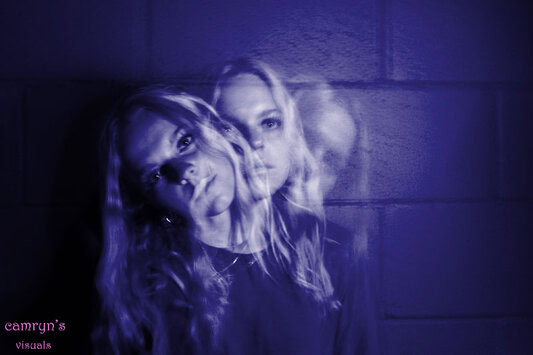
Directions for Photographing 

Preparing for the photo

  • This works best in a dark room
  • Set up a tripod  
  • Set your camera to TV
  • Set your shutter speed to 3 to 15 seconds (depending on your photo)

Step 1: 

  •  Hold the flash light on the person so the camera can focus   
    • If you do not have enough light the camera can not focus. 
  • While the light is shinning on the person, Lock in focus
    • Press the shutter to take your photo
Step 2: 
  • Keep the light on the person for a split second
  • Remove the light so the person is in the dark


     Light On                                     Light Off


Step 3: 

  • Have the person move to another position
    • Flash the light on Person for a quick second
      • The longer the light is on them, the less transparent they will appear
        • Turn of the light and have them move again


                 Light On                                        Light Off


Step 4: 

  • Turn the light off and have your person move a third position
    • Flash the light on them for a second
      • Turn of the light and have them move again.

                                                                        Light On                                      Light Off


  • Your ghost photo is now ready to edit